Tuesday, April 5, 2011

J Square Tech: Update iPhone 4 to 4.3.1 With Preserving 01.59.00 ...

id='post-body-1765364837525389324'>
You can follow this guide to update your iPhone 4 to iOS 4.3.1 without updating to the new baseband, you will preserve the unlockable baseband 1.59.00 to be able to unlock your iPhone 4 with ultrasn0w 1.2.

Note: This ONLY Works with the iPhone 4!


Step 1: Download TinyUmbrella from here Also make sure to download the iPhone 4 iOS 4.3.1 which you can find here.



Step 2: Double click the downloaded TinyUmbrella.exe file.



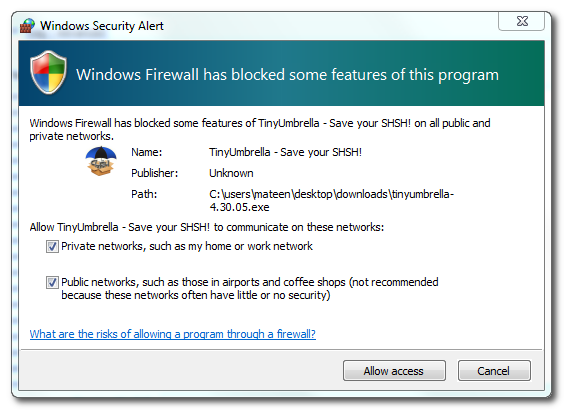
If you get a Windows Firewall notification, check both boxes and click Allow Access.


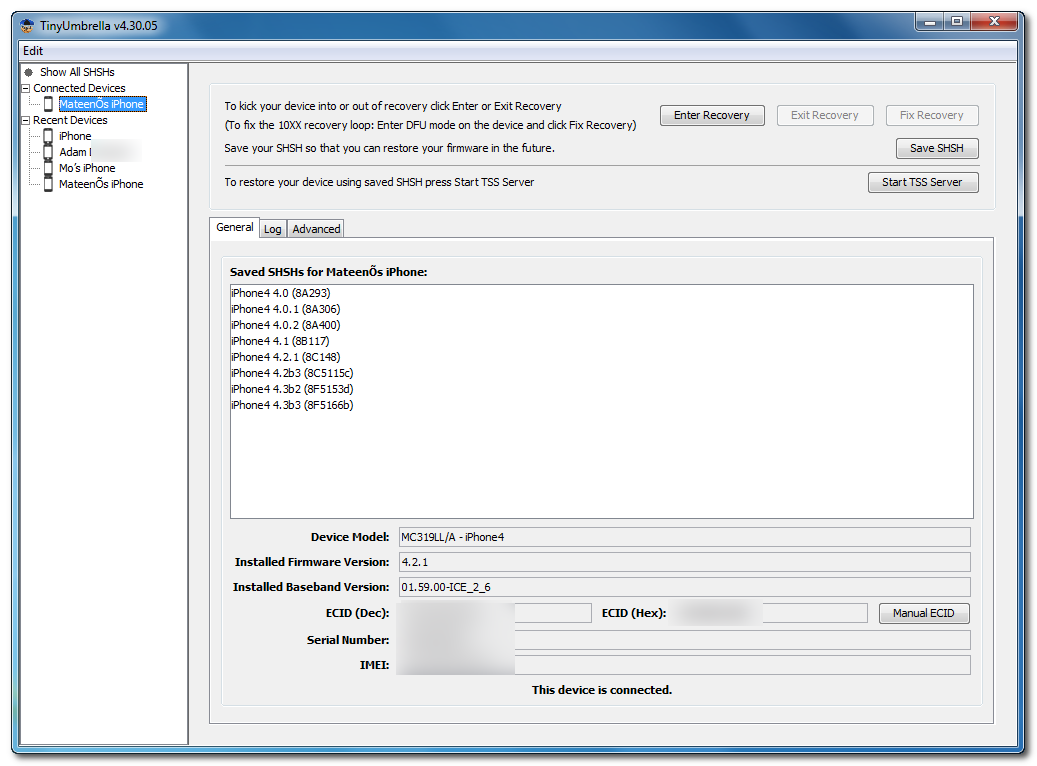
Step 3: Make sure the device is connected, and Umbrella has detected the type of device and its firmware.

undefined


**If you haven't already saved your iOS 4.3.1 SHSH blobs then click "Save SHSH". Make sure they successfully save before continuing.


Step 4: Hit "Start TSS Server" and make sure you receive no errors.


Once The TSS Server is "running" successfully, umbrella will kill iTunes. Leave TinyUmbrella Open. You can double check to see if the TSS server is running under the Log tab.


If you do receive an error, DO NOT continue. Your restore will not work if the TSS server cannot be started.


Step 5: Open iTunes by doubling clicking its icon.


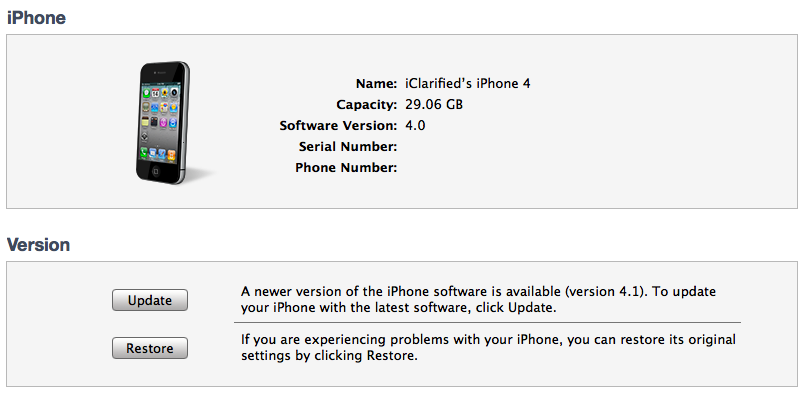
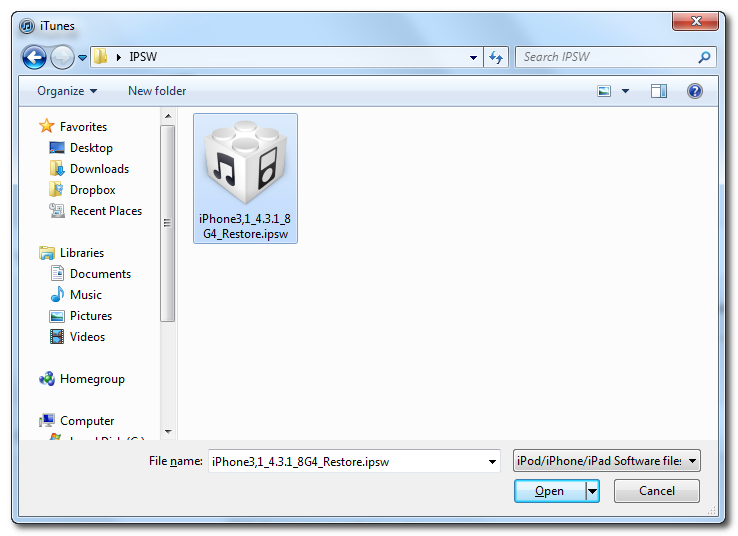
Hold down the Shift key and click Restore


Select your iPhone 4.3.1 firmware file from the popup window that appears and click Open.

undefined


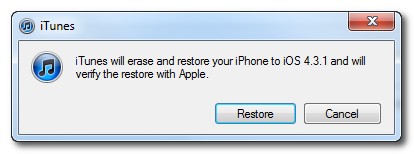
Click Restore to begin restoring your device.


Step 6: iTunes should give you error 1013. This is what we wanted, as it notes the baseband has not updated :) Click Ok and close iTunes.
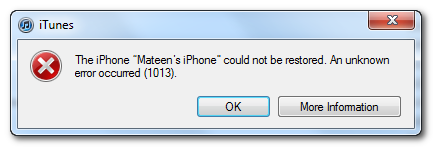


If you get a 16XX error then try entering DFU and go to step 5.
If your restore does NOT end in a 1013, it means your baseband was updated. This is likely because you did not have the TSS server running OR you updated without TinyUmbrella OR you are working with a device OTHER than iPhone 4.


Step 7: Place your iPhone into DFU mode by holding down both the Power and Home buttons for ten seconds, then release the Power button and continue holding the Home button for another 5 seconds.



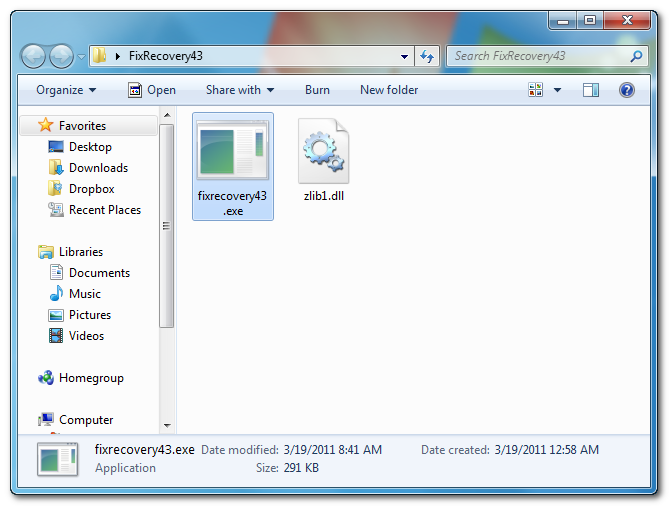
Step 8: Fix Recovery in TinyUmbrella is currently not working. Download this standalone .exe file to fix recovery on 4.3.1. Extract the file and double click on fixrecovery43.exe. A command prompt will open, and the program will go through the process. During this time, you will notice scrolling text on your iPhone 4.


Thanks to iClarified & Semaphore


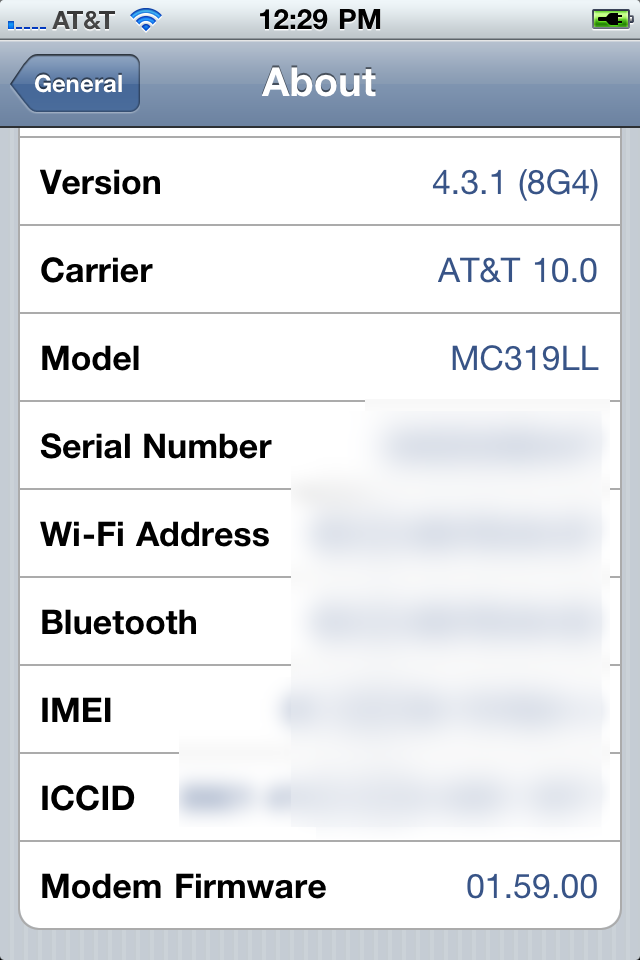
Step 9: Your iPhone will now be on 4.3.1 with the 1.59.00 baseband! (Which means you can now unlock using this tutorial)

undefined

Thanks iClarified & semaphore

Source: http://jsquaretech.blogspot.com/2011/04/update-iphone-4-to-431-with-preserving.html

»»  read more

Monday, April 4, 2011

News@8pm: IPhone 5 release set for June and Xoom price

>


Future mobile handsets showing up before they are supposed to is the tech industry's bi-weekly Christmas. Today we have been offered advanced peeks of both future HTC and BlackBerry devices. Whilst the HTC New Eden Concept No. 1 was a deliberate release as part of the concept phone project, the appearance of RIM's BlackBerry Bold Touch on Youtube was certainly not planned with the feature revealing videos quickly given the chop.


------------------------------------------------------------------------------------------------------------------------------------------------------------------
App of the Day | Metro
The Metro app offers up-to-the-minute but fairly superfiical showbiz, news, sport and tech news
T3 App Chart | Top 10 Nokia AppsMetro Review
------------------------------------------------------------------------------------------------------------------------------------------------------------------


Back to the Future and Motorola's Xoom tablet has seen a price drop just days ahead of the device being officially released to a UK market. Now just £479.99 the Android 3.0 tablet is price competitive with the similarly specced iPad although with a considerably smaller following. Elsewhere in future news and Toshiba officially confirmed it will have mastered glasses-free 3DTV within 12 months.


Apple devices leak and we love to snap them up, today saw the next-gen Apple iPod Touch rear its head with a capacitive home button doing away the physical button and storage space being bumped to 128GB. Keeping with Apple and new reports suggest that the upcoming Apple iPhone 5 will official launch in June.


Gaming hit and miss stories round off today's News@8pm. Starting with the miss and EA is facing a billion dollar lawsuit after the developer behind the original Madden release sues over lost royalties. Now to the hit and Microsoft is rumoured to be bringing an app store to the Xbox 360 Marketplace within a matter of weeks.


Posted by Luke Johnson


Source: T3.com News


Source: http://the-gadget-blogger.blogspot.com/2011/04/news8pm-iphone-5-release-set-for-june.html

»»  read more

Saturday, April 2, 2011

Something Good..: Windows 8 out now

id='post-body-1181514749297190582'>


WinRumor is reporting that Microsoft has started sending early access invitation of Windows 8 pre-build to OEMs via their Microsoft Connect program. The newly launched program named “Windows 8 and Server vNext Pre-Release Program” provides download access to Windows 8 build 7971.0.110324-1900 to selected OEM partners via personalized access links which look like http://connect.microsoft.com/site1094/InvitationUse.aspx?ProgramID=5474&InvitationID=XXX-XXXX-XXXX where XXX-XXXX-XXXX is the unique invitation code. A fresh set of complete step-by-step installation screenshots (posted after the jump) of Windows 8 also confirms the news.


Windows 8 Setup

Microsoft Windows 8 Installation Process
Windows 8 Full Setup Process

Winrumors also reports that :


“Microsoft is expected to be readying a Windows 8 beta for September. Microsoft’s primary Windows 8 interface is believed to be fully 3D. The interface will be “fully dynamic” and able to adapt to user habits. Icons and shortcuts will adapt to different usage scenarios to speed up daily tasks.”
“Windows 8 is also rumored to include a new fast hibernation system. The system will hibernate in around three to six seconds and save all open documents and running tasks. Rumors suggest that Microsoft will create a dual-UI for Windows 8. A tile-based user interface codenamed “Mosh” will reportedly be included.”


Hey guys, We are eagerly awaiting for a "Windows 8 setup download" leak :), anybody listening !


Source: http://igupta191.blogspot.com/2011/04/windows-8-out-now.html

»»  read more

Monday, March 28, 2011

Latest Windows Phone 7 News in Google News | Twitter | Facebook ...

>


I'm back in the office after a brief hiatus between March 22 and March 27. Here is what happened while I was gone:


Firefox 4. Mozilla released the new version of its free Web browser, Firefox 4 last week. It came a week after Microsoft released the competing browser Internet Explorer 9.


So far Firefox appears to be leading the pack with downloads. Firefox 4 was downloaded 7.1 million times in the first 24 hours. Internet Explorer 9 was downloaded 2.3 million times on the first day. In the first 48 hours, 15.85 million copies of Firefox 4 were downloaded.


The popularity of Microsoft's browser is hampered by the fact that it does not run in Windows XP -- it is only available for Vista and Windows 7. Microsoft has said in a statement it does not support XP with the latest browser because, "The browser is only as good as the operating system it runs on and a browser running on a ten-year-old operating system tethers the web to the past."


Also, the team that builds Internet Explorer is in the Windows division at Microsoft, which wants to drive upgrades to Windows 7.


Here is where you can download Firefox 4.


Problems with Windows Phone 7 updates. Microsoft acknowledged that it's having problems delivering updates to Windows Phone 7 users. Many people who bought Windows phones since they started selling in the fall have been anxiously awaiting this update because it adds the ability to copy and paste text.


Microsoft posted a video featuring Corporate Vice President Joe Belfiore, who also posted this comment on its website, "We know it’s been frustrating to wait for features/fixes and (probably worse) to hear little from us on specific dates. We are sorry the process has been rocky."


If you are a Windows Phone 7 user and you are still wondering dude, where's my update, Microsoft has also posted a frequently asked questions for Windows Phone 7 users about the update.


Observers are watching how Windows Phone 7 performs because Microsoft's smartphone operating system is so far behind Google's Android and Apple's iPhone in market share. Windows Phone 7 began selling on phones in the fall.


Source: http://seattletimes.nwsource.com/html/microsoftpri0/2014620261_whileiwasgone.html


Source: http://wp7windowsphone7.blogspot.com/2011/03/while-i-was-gone-firefox-4-windows.html

»»  read more

Tuesday, March 22, 2011

DC Metro app for WP7: Metro Rail info for Commuters and Vistors Alike

>


It looks as if WMATA commuters were the next in line to get their own WP7 app that will help them navigate the DC Metro rail system. NY has one, so why not DC?


With the DC Metro app, you can check current arrival/departure times per metro line, service interruptions, and follow official tweets and other news from the metro authority. If you're a newbie to DC, the app will show you nearest stations and list all of the stops per line.


The latest version (1.1) of DC Metro fixes line color bugs and offers the functionality to save stations as favorites for quick station information without jumping through too many hoops.


This app is particular to the metro rail portion of the WMATA, and does not include bus info. Maybe the app can gain enough traction to add that portion in future releases? (hint, hint).


In order to do that, you will have to download the free DC Metro app for WP7 devices and spread the word and/or add that request in the review page of the app.


Source: http://www.appscout.com/2011/03/dc_metro_app_for_wp7_metro_rai.php


Source: http://wp7windowsphone7.blogspot.com/2011/03/dc-metro-app-for-wp7-metro-rail-info.html

»»  read more